# Redemption period
| Previous state | State | Next state(s) |
| -------------- | --------- | -------------------------------------- |
| LISTED | COMMITTED |
REDEEMED REVOKED CANCELED
|
#### Period actions
| Seller | Buyer | Dispute resolver |
| ----------------------- | ----------- | ---------------- |
| Revoke rNFT | Cancel rNFT | / |
| Extend voucher validity | Redeem rNFT | |
| | Trade rNFT | |
#### Post-period actions
| Seller | Buyer | Dispute resolver |
| ----------- | ----------- | ---------------- |
| Expire rNFT | Expire rNFT | Expire rNFT |
***
### TypeScript SDK
{% tabs %}
{% tab title="Revoke rNFT" %}
Burns rNFT, returns the price to the buyer. The seller's deposit is given to the buyer.
```typescript
const exchangeId = "1534";
await sellerCoreSDK.revokeVoucher(exchangeId);
```
{% endtab %}
{% tab title="Cancel rNFT" %}
Burns rNFT, and returns the price back to the buyer, except for the buyer's cancellation fee, which is given to the seller.
```typescript
const exchangeId = "1534";
await buyerCoreSDK.cancelVoucher(exchangeId);
```
{% endtab %}
{% tab title="Redeem rNFT" %}
Moves the exchange into the dispute period.
```typescript
const exchangeId = "1534";
await buyerCoreSDK.redeemVoucher(exchangeId);
```
{% endtab %}
{% endtabs %}
### Widget
{% tabs %}
{% tab title="Redeem rNFT" %}
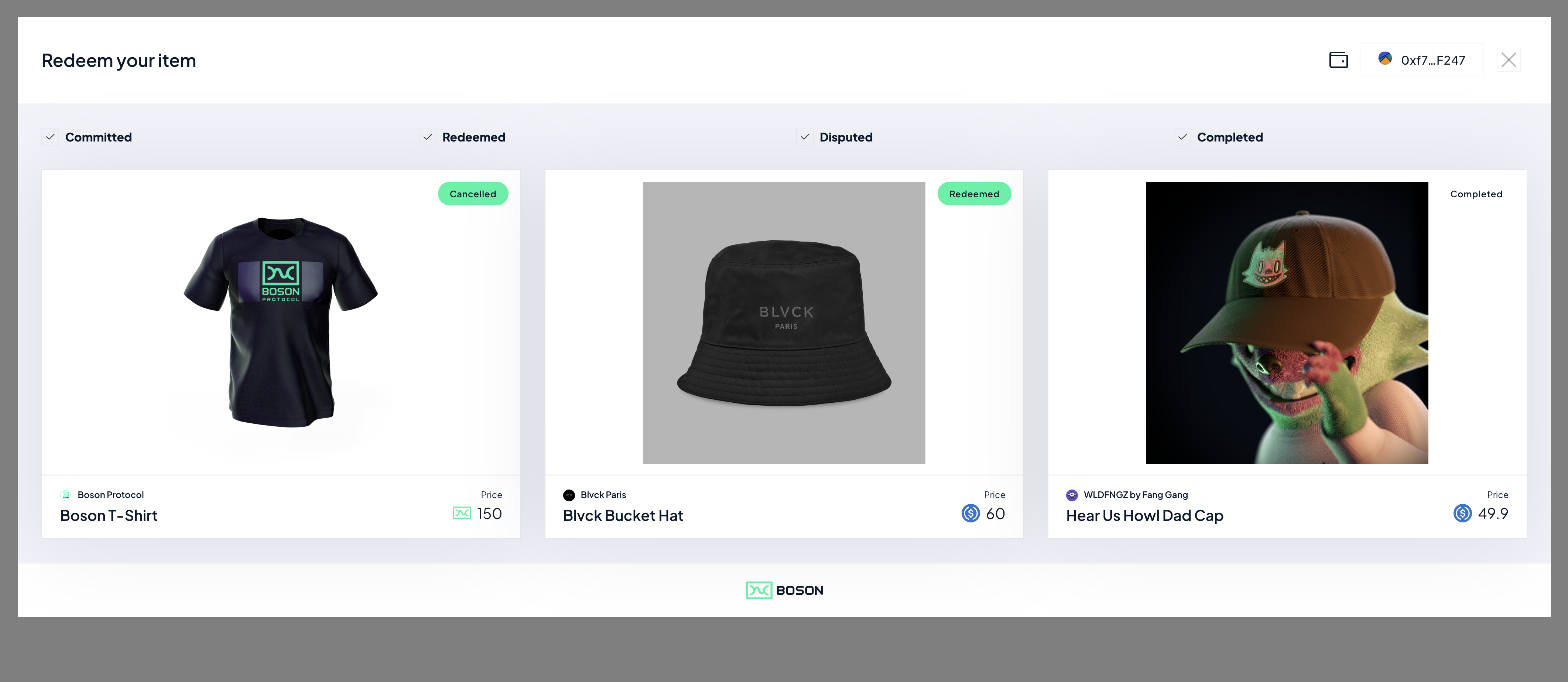
Moves the exchange into the dispute period.
To integrate the Boson Redemption Widget, all a seller needs to do is:
1. Add the following `
```
2. The Seller then needs to create a button with the fragment identifier *id="boson-redeem"*. When clicked, the redeem modal will popup on the Seller's website.
```html
```
### Using the Boson Redemption Button
As a seller you can also chose to use the Boson branded "Redeem" Button on your website, if you would like to do this, all you need to do is :
1. Add the below 2 lines of code in HTML `` section:
```html
...
```
2. Add the below class name to the "boson-redeem" button:
```html
```
#### Redeeming a specific rNFT
The Boson Widget's default behaviour is to show a buyer all of their redeemable vouchers, the widget be configured to direct a buyer to a given rNFT for redemption, this enables different user flows. This the way that the Widget is used on [the Boson dApp](https://bosonapp.io/).
A Seller can specify which exchange is going to be redeemed by the widget, by:
1. add a *data-exchange-id* tag to the "boson-redeem" button, specifying the exchangeId of a given exchange:
```html
```
You can find an example HTML file which embeds the
{% endtab %}
{% endtabs %}
### Solidity
{% tabs %}
{% tab title="Revoke rNFT" %}
Burns rNFT, returns the price to the buyer. The seller's deposit is given to the buyer.
```solidity
IBosonExchangeHandler bosonProtocol = IBosonExchangeHandler(_bosonProtocolAddress);
uint256 exchangeId = 1534;
bosonProtocol.revokeVoucher(exchangeId);
```
{% endtab %}
{% tab title="Cancel rNFT" %}
Burns rNFT, and returns the price back to the buyer, except for the buyer's cancellation fee, which is given to the seller.
```solidity
IBosonExchangeHandler bosonProtocol = IBosonExchangeHandler(_bosonProtocolAddress);
uint256 exchangeId = 1534;
bosonProtocol.cancelVoucher(exchangeId);
```
{% endtab %}
{% tab title="Redeem rNFT" %}
Moves the exchange into the dispute period.
```solidity
IBosonExchangeHandler bosonProtocol = IBosonExchangeHandler(_bosonProtocolAddress);
uint256 exchangeId = 1534;
bosonProtocol.redeemVoucher(exchangeId);
```
{% endtab %}
{% tab title="Expire rNFT" %}
After the period ends, and if no actions were taken, anyone can expire the rNFT. The outcome is equivalent to the buyer's "Cancel rNFT" action - burns rNFT, and returns the price back to the buyer, except for the buyer's cancellation fee, which is given to the seller.
```solidity
IBosonExchangeHandler bosonProtocol = IBosonExchangeHandler(_bosonProtocolAddress);
uint256 exchangeId = 1534;
bosonProtocol.expireVoucher(exchangeId);
```
{% endtab %}
{% endtabs %}
### External actions
#### Trade rNFT
rNFT is ERC721 token which can be transferred between wallets and traded on the secondary markets. Although there are no restrictions which marketplaces can be used, the recommended way is to use Boson sequential commit.
Sequential commit